QuickBooks LiveLessons (Video Training): For All QuickBooks Pro, Premier and Enterprise Users
- By Laura Madeira
- Published Dec 11, 2011 by Que. Part of the LiveLessons series.
Online Video
- Your Price: $39.99
- About this video
Accessible from your Account page after purchase. Requires the free QuickTime Player software.
Videos can be viewed on: Windows 8, Windows XP, Vista, 7, and all versions of Macintosh OS X including the iPad, and other platforms that support the industry standard h.264 video codec.
Register your product to gain access to bonus material or receive a coupon.
Description
- Copyright 2012
- Edition: 1st
- Online Video
- ISBN-10: 0-7897-4834-7
- ISBN-13: 978-0-7897-4834-8
Video includes:
• Six+ hours of video instruction
• Over 50 tips and techniques
• Skills you can learn in fifteen minutes or less
For every entrepreneur, manager, accountant, and bookkeeper who wants to master QuickBooks fast!
Laura Madeira, QuickBooks Advanced Certified ProAdvisor and member of the elite Intuit Trainer Writer Network shares with you her practical expertise in using the QuickBooks software.
Are you a business owner? Do you need help with your accounting software setup? Would you like a consultant to help you learn? In this video Laura is your own personal consultant as she provides easy to follow instructions on how to properly setup and use your QuickBooks software. Click play to follow along as Laura helps you learn how to use the many features of QuickBooks. Laura makes business accounting with QuickBooks "easy" for the non-accountant business owner with her straightforward approach to learning explaining both the "why" and "how" of an activity.
Laura Madeira, Advanced Certified QuickBooks ProAdvisor and member of the elite Intuit Trainer/Writer Network. Laura has presented to thousands of users the "What's New for QuickBooks" each fall. Laura is the author of QuickBooks 2010 Solutions Guide and co-author of QuickBooks 2010 on Demand.
Looking for a better way to master today's rapidly changing technologies? Want expert help, but don't have the time or energy to read a book? Can't find classroom training worth the money? Discover LiveLessons: self-paced, personal video instruction from the world's leading experts. LiveLessons are video courses organized into bite-sized, self-contained sessions-you'll learn key skills in as little as 15 minutes!
TABLE OF CONTENTS
Section 1: Getting Around QuickBooks
Learning Objectives
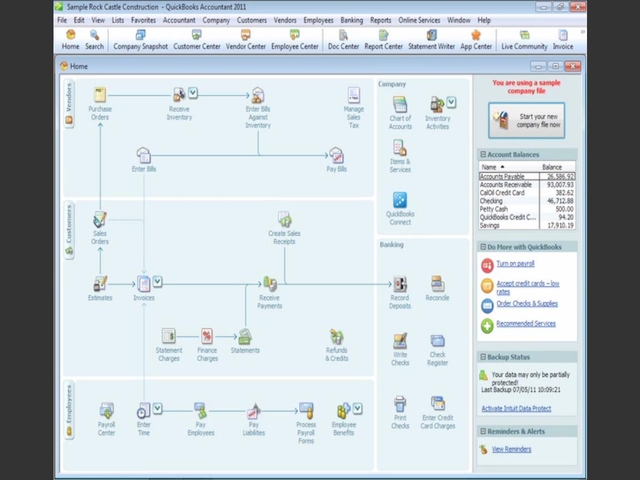
Lesson 1: Home Page and Navigation
Lesson 2: In Product Tutorials
Lesson 3: Preferences
Lesson 4: Help Options
Lesson 5: Using QuickBooks Sample Company Data
Section 2: Creating a New QuickBooks File
Learning Objectives
Lesson 6: Converting From Other Accounting Software
Lesson 7: Easy Step Interview and Quick Start Center
Lesson 8: Setting Up Users and Permissions
Lesson 9: Working With the Chart of Accounts
Lesson 10: Creating a QuickBooks Backup
Lesson 11: Selecting a Company File to Open
Section 3: QuickBooks Lists
Learning Objectives
Lesson 12: Items List Purpose and Types
Lesson 13: Adding to or Modifying the List of Items
Lesson 14: Importing Lists From Excel
Lesson 15: Other Lists in QuickBooks
Lesson 16: Memorized Transactions List
Lesson 17: Reporting on Lists
Section 4: Managing Inventory
Learning Objectives
Lesson 18: Inventory Item Types
Lesson 19: Importing Inventory Items
Lesson 20: Proper Inventory Processes
Lesson 21: Adjusting Inventory
Lesson 22: Inventory Reporting
Section 5: Vendor Activities
Learning Objectives
Lesson 23: Customize Home Page Vendor Activities
Lesson 24: Working With the Vendor Center
Lesson 25: Entering Vendor Billand Credits
Lesson 26: Paying Vendor Bills
Lesson 27: Accounts Payable Reporting
Section 6: Customer Activities
Learning Objectives
Lesson 28: Customize the Home Page Customer Activities
Lesson 29: Working With the Customer Center
Lesson 30: Proper Sales Tax Setup
Lesson 31: Creating Customer Invoices
Lesson 32: Recording the Customer Payment
Lesson 33: Accounts Receivable Reporting
Section 7: Employee and Payroll Setup
Learning Objectives
Lesson 34: Learn About Payroll Options
Lesson 35: Preferences and Payroll Setup Wizard
Lesson 36: Paying Employees and Payroll Liabilities
Lesson 37: Printing Paychecks and Payroll Liability Payments
Lesson 38: Adjusting Payroll Liabilities
Lesson 39: Preparing State and Federal Payroll Forms
Lesson 40: Payroll Reporting
Section 8: Reporting in QuickBooks
Learning Objectives
Lesson 41: Accounting Basics
Lesson 42: Reporting Preferences
Lesson 43: Using the Report Center
Lesson 44: Using the Company Snapshot
Lesson 45: Modifying and Memorizing Reports
Section 9: Working With Bank Accounts
Learning Objectives
Lesson 46: Using the Write Check Form and Printing Checks
Lesson 47: Transferring Funds Between Bank Accounts
Lesson 48: Online Banking Center
Lesson 49: Reconciling the Bank Account
Lesson 50: Troubleshooting Bank Reconciliation Errors
Section 10: Additional Tools
Learning Objectives
Lesson 51: Loan Manager
Lesson 52: Planning and Budgeting
Lesson 53: Year-end Guide
Lesson 54: Syncing QuickBooks Lists With Microsoft Outlook Contacts
Lesson 55: Using the QuickBooks Timer
Section 11: Sharing Data With Your Accountant
Learning Objectives
Lesson 56: Methods of Sharing Your Data
Lesson 57: Creating an Accountant's Copy
Lesson 58: Benefits of Working With An Accountant's Copy
Lesson 59: Limitations When Working With an Accountant's Copy
Lesson 60: Importing Accountant's Changes
LiveLessons Video Training series publishes hundreds of hands-on, expert-led video tutorials covering a wide selection of technology topics designed to teach you the skills you need to succeed. This professional and personal technology video series features world-leading author instructors published by your trusted technology brands: Addison-Wesley, Cisco Press, IBM Press, Pearson IT Certification, Prentice Hall, Sams, and Que. Topics include: IT Certification, Programming, Web Development, Mobile Development, Home & Office Technologies, Business & Management, and more. View All LiveLessons at http://www.quepublishing.com/imprint/series_detail.aspx?st=87397